
Think of your app like a restaurant:
React is the dining area (what users see and interact with)
Flask is the kitchen (where the real work happens)
Benefits:
Clean separation of frontend and backend
Faster development
Easy to scale and maintain
Perfect for APIs and modern apps
What You’ll Need
Before we begin, make sure you have:
Basic knowledge of JavaScript & React
Basic knowledge of Python & Flask
Node.js installed
Python installed
Project Structure (Clean & Professional)
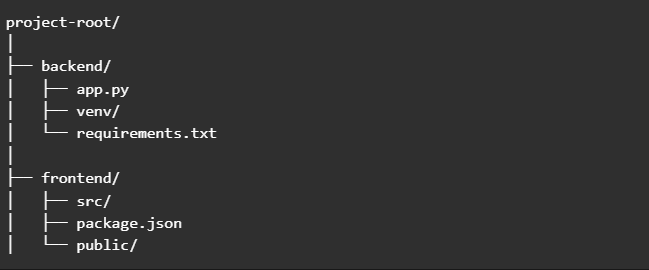
Step 1: Create the Flask Backend
1️⃣ Install Flask

2️⃣ Create app.py
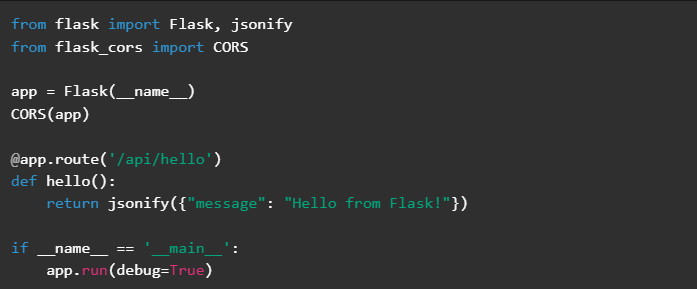
Why flask-cors? It allows React (running on a different port) to communicate with Flask safely.
Run the backend:

Your Flask API runs on http://localhost:5000
Step 2: Create the React Frontend
1️⃣ Create React App

React runs on http://localhost:3000
Step 3: Connect React to Flask
Now the fun part — connecting the two
Update App.js
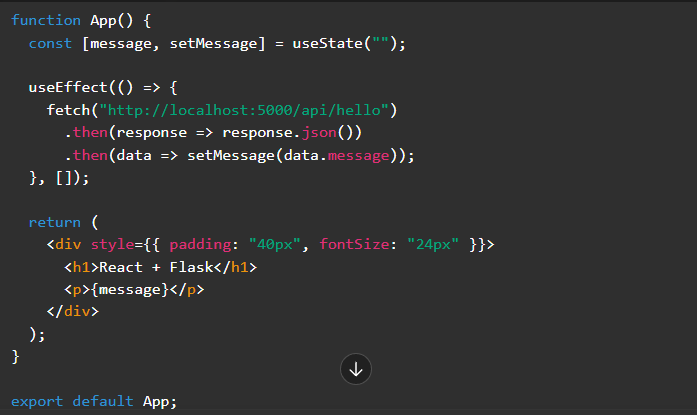
Boom! React is now talking to Flask.
Handling Production (Professional Tip)
For production:
Build React:

Serve React’s build folder using Flask
Use environment variables for API URLs
Common Mistakes (And How to Avoid Them)
❌ Forgetting CORS → Use flask-cors
❌ Wrong API URL → Double‑check ports
❌ Mixing frontend & backend logic → Keep them separate.
Connecting React and Flask gives you:
A powerful frontend
A flexible backend
A professional‑grade web application
Whether you’re building a portfolio project, startup idea, or learning full‑stack development — React + Flask is a winning combo.
